

Deposit process
The following diagram illustrates how a deposit is processed:
- Cobo reserves the right to reject a deposit transaction if it violates compliance regulations.
- If the transaction amount is below the minimum deposit threshold, the transaction will not be processed and no record will be created. You can call the Get token information operation to retrieve the minimum deposit amount for each token type.
Withdrawal process
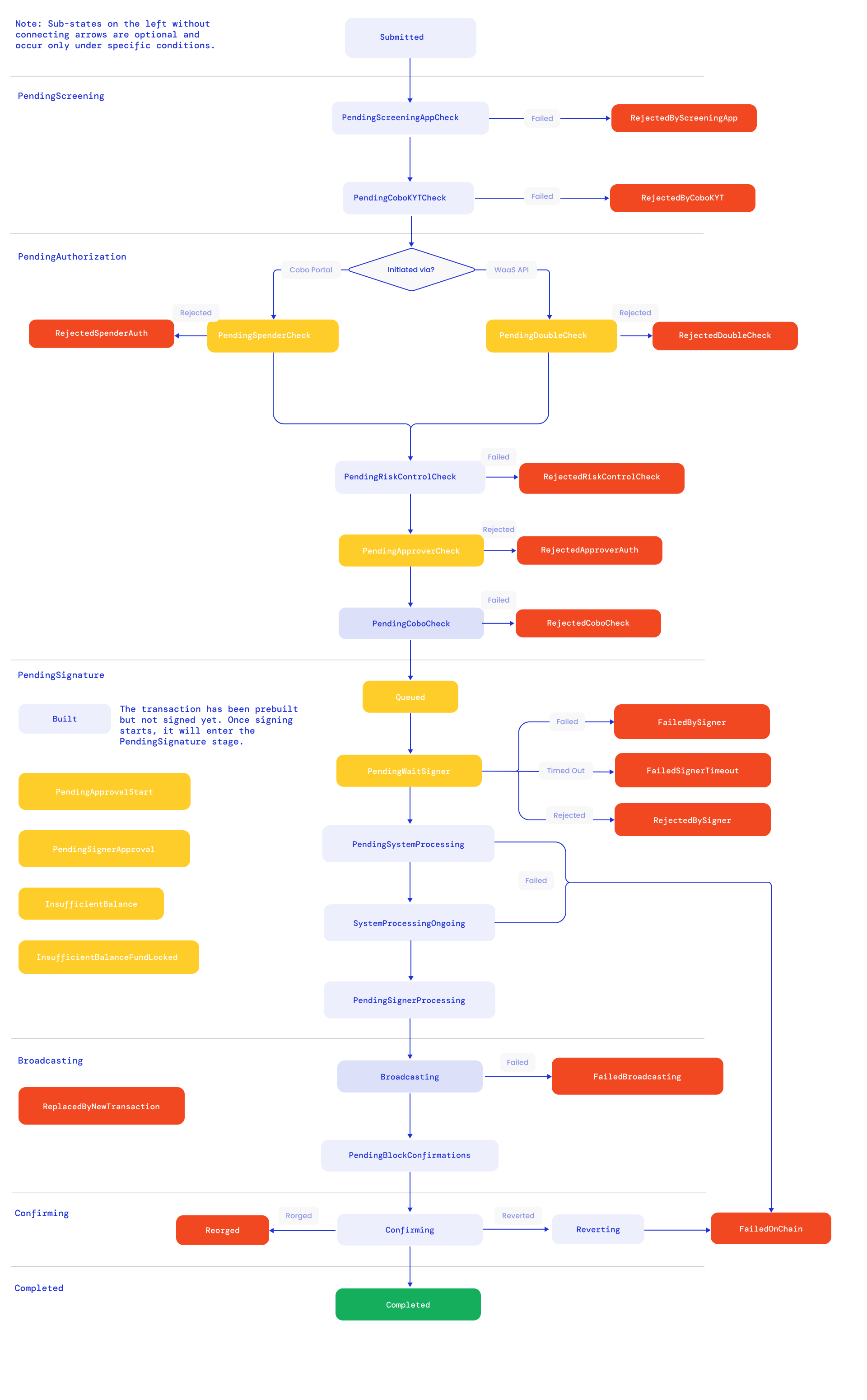
The following diagram illustrates how a withdrawal is processed. Colors are used to indicate different status types:- Yellow: User action is required for the transaction to proceed
- Green: Completed successfully
- Red: Unsuccessful, including failed or rejected statuses
Sub-states on the left without connecting arrows are optional and occur only under specific conditions.
For better visibility, open the image in a new tab.
- If a withdrawal is rejected or unsuccessful, the tokens will be returned to your wallet, and your balance will remain unchanged.
- If your withdrawal amount is smaller than the minimum withdrawal threshold, the withdrawal request will receive an error. You can call the Get token information operation to retrieve the minimum withdrawal amount for each token type.